How to See Liked Reels on Instagram Easily: Complete Guide

Instagram has become a daily habit for millions of people. From morning news to late-night entertainment, Reels now sit at the heart of the platform. Many users enjoy short videos, tap the like button, and then move on. Later, a familiar thought appears: where did that Reel go? This guide explains how to see liked Reels on Instagram, step by step, in a simple and clear way.
Understanding this feature helps you rediscover useful tips, funny clips, educational videos, and inspiring content you once enjoyed. Instagram has not hidden your liked Reels, but it has placed them quietly inside your account settings.
Why People Want to Find Liked Reels on Instagram
Reels move fast, like leaves floating down a river. One swipe replaces the next, and soon what you loved feels lost. People search for liked Reels for many reasons. Some want to save cooking recipes, others want fitness routines, while many just want to rewatch a funny moment.
Instagram tracks your interactions, including likes, comments, and saves. This activity history allows you to view Reels you have liked before, even weeks or months later.
Common reasons users look for liked Reels include:
- Rewatching educational or motivational videos
- Saving content for later use
- Sharing a Reel with friends
- Finding creators they enjoyed
- Recovering accidentally lost Reels
How Instagram Stores Your Liked Reels
Instagram treats Reels just like posts and videos. When you like a Reel, it is stored under your account activity. This section records everything you interact with, quietly preserving your digital footsteps.
Liked Reels are not shown on your profile for others to see. They are private and only visible to you. This makes it a personal archive of your interests.
How to See Liked Reels on Instagram Step by Step
Finding your liked Reels is simple once you know where to look. Follow these steps carefully.
Step 1: Open the Instagram App
Make sure your Instagram app is updated to the latest version. This works on both Android and iPhone devices.
Step 2: Go to Your Profile
Tap your profile picture in the bottom-right corner of the screen.
Step 3: Open the Menu
Tap the three horizontal lines in the top right corner. This opens the settings menu.
Step 4: Tap on Your Activity
From the menu, select Your activity. This is where Instagram stores likes, comments, and interactions.
Step 5: Select Likes
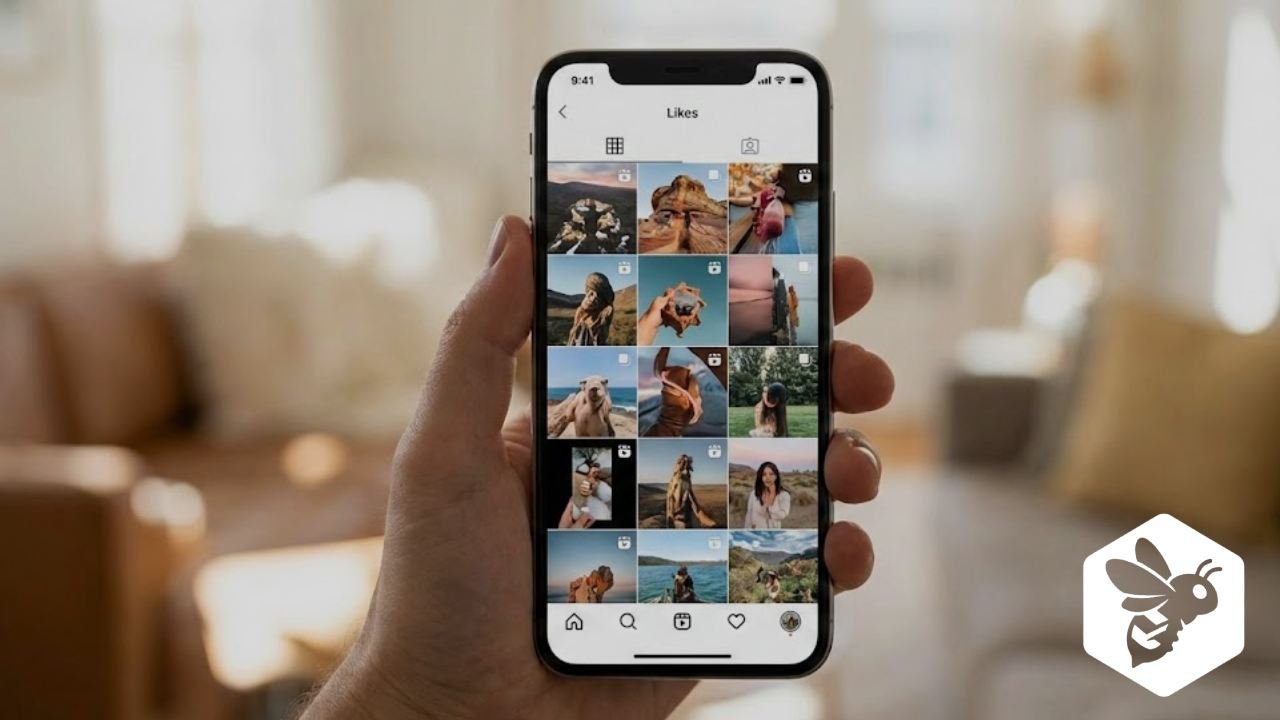
Tap on Likes. You will now see all posts and Reels you have liked.
Step 6: Filter to See Reels Only
Instagram automatically mixes posts and Reels, but Reels are clearly visible with the video icon. Scroll to find your liked Reels easily.
This method works for anyone wondering how to find liked Reels on Instagram without using third-party apps.
Table: Quick Steps to Find Liked Reels
| Step | Action |
|---|---|
| 1 | Open Instagram app |
| 2 | Go to your profile |
| 3 | Open the Menu |
| 4 | Select Your activity |
| 5 | Tap Likes |
| 6 | Scroll to view liked Reels |
How to See Liked Reels on Instagram Using Filters
Instagram also allows filtering liked content. This makes it easier when your likes list is long.
You can sort by:
- Date range
- Content type
- Newest to oldest
This helps users who want to check liked Reels Instagram history without endless scrolling.
Difference Between Liked Reels and Saved Reels
Many users confuse likes with saves. Both serve different purposes, and understanding them helps manage content better.
Liked Reels
- Stored in activity history
- Shows content you appreciated
- Can be unliked anytime
Saved Reels
- Stored in the Saved section
- Meant for long-term use
- Can be organised into collections
Table: Liked Reels vs Saved Reels
| Feature | Liked Reels | Saved Reels |
|---|---|---|
| Location | Your Activity | Saved Section |
| Purpose | Quick appreciation | Long-term reference |
| Organization | No folders | Collections available |
| Privacy | Private | Private |
How to Save Reels for Easy Access in the Future
If you often lose track of liked Reels, it’s better to save them. To save a Reel, tap the bookmark icon under the video. Saved Reels stay organized and easier to find later.
This is useful for users searching where are my liked Reels on Instagram and wanting a better system.
Why Liked Reels Sometimes Do Not Appear
Sometimes users report that their liked Reels are missing. This can happen due to several reasons.
Possible causes include:
- Reel deleted by creator
- Account deactivated
- App not updated
- Temporary Instagram glitch
If a Reel is deleted, it disappears permanently from your liked list.
How to Fix Liked Reels Not Showing
If your Instagram liked Reels history is not loading, try these solutions.
Update the App
Older versions may not show activity properly.
Clear App Cache
Clearing the cache helps remove bugs without deleting data.
Log Out and Log In
Refreshing your account often fixes display issues.
Check Internet Connection
Slow internet can prevent activity from loading.
Can You See Someone Else’s Liked Reels?
No. Instagram respects privacy. You cannot see which Reels another user has liked. In the past, activity feeds showed likes, but Instagram removed this feature.
You can only view your own liked Reels through your activity section.
How Far Back Can You See Liked Reels on Instagram
Instagram lets you scroll back months or even years, depending on your activity. No fixed limit is shown, but heavy users may find older likes harder to reach.
Using date filters helps narrow down results when searching for older liked Reels.
Tips to Manage Your Liked Reels Better
A little care today saves time tomorrow. These habits help you keep your Instagram experience tidy.
Helpful tips include:
- Save important Reels instead of only liking them
- Create collections for different interests
- Unlike Reels, you no longer need
- Use filters in activity history
These small steps make finding Reels easier and less stressful.
Best Practices for Managing Reels
| Tip | Benefit |
|---|---|
| Save useful Reels | Easy future access |
| Use collections | Organized content |
| Clear old likes | Clean activity history |
| Update app | Fewer glitches |
Final Thoughts
Instagram moves fast, but it also remembers. Every time you tap, it leaves a quiet mark, stored safely in your activity history. Learning how to see liked Reels on Instagram gives you control over your past interests and helps you reconnect with content that mattered to you.
Like a well-kept journal, your liked Reels tell a story of what inspired, entertained, and taught you. With a few simple steps, that story is always within reach, waiting patiently for you to return.
Frequently Asked Questions About Liked Reels
Can I see liked Reels on Instagram after a long time?
Yes, Instagram keeps your liked Reels in your account activity. You can scroll back to see older Reels, unless the creator has deleted the video or their account.
Why can’t I find some Reels I liked before?
If a Reel is missing, it is usually because the creator deleted it, made their account private, or removed the content. App glitches or outdated versions can also cause this issue.
Is there a difference between liked Reels and saved Reels?
Yes. Liked Reels are stored in your activity history, while saved Reels are kept separately in your Saved section and can be organised into collections for easy access.
Can other people see which Reels I have liked?
No, your liked Reels are private. Other users cannot see your liked Reels or your activity history on Instagram.
Can I see liked Reels on Instagram using a computer?
Instagram currently shows liked Reels more clearly on the mobile app. While you can log in on a desktop, the full activity and likes section works best on Android or iPhone.