How to Post Reels on Instagram: Step-by-Step 2026

Instagram Reels are now one of the strongest ways to speak to the world in short, moving moments. Like handwritten letters of the past, they carry emotion, meaning, and message, but they travel faster than ever. Whether you are a beginner or someone looking to improve reach, learning how to post Reels on Instagram properly can change how people see your content.
What Are Instagram Reels?
Instagram Reels are short vertical videos that can be up to 90 seconds long. They appear in different places on Instagram, including the Reels tab, Explore page, and your profile. Reels are designed to be engaging, quick, and easy to watch.
Reels help accounts reach new people because Instagram often shows them to users who are not already following you. This is why Reels are important for creators, businesses, bloggers, and news pages.
Why Instagram Reels Are Important?
Reels are not just another feature. They are at the heart of Instagram today.
Main reasons Reels matter:
- They get more reach than normal posts
- They increase likes, comments, and shares
- They help new accounts grow faster
- They are easy to create with simple tools
Requirements Before Posting a Reel
Before posting, make sure a few basic things are in place. These small details save time and improve quality.
Basic requirements:
- Updated Instagram app
- Stable internet connection
- Vertical video format
- Clear video and sound
How to Post Reels on Instagram?
Posting a Reel follows a simple path. These steps have stayed mostly the same, even as new features are added.
Step 1: Open the Instagram App
Open Instagram on your phone and log into your account. You should see the home feed with posts from people you follow.
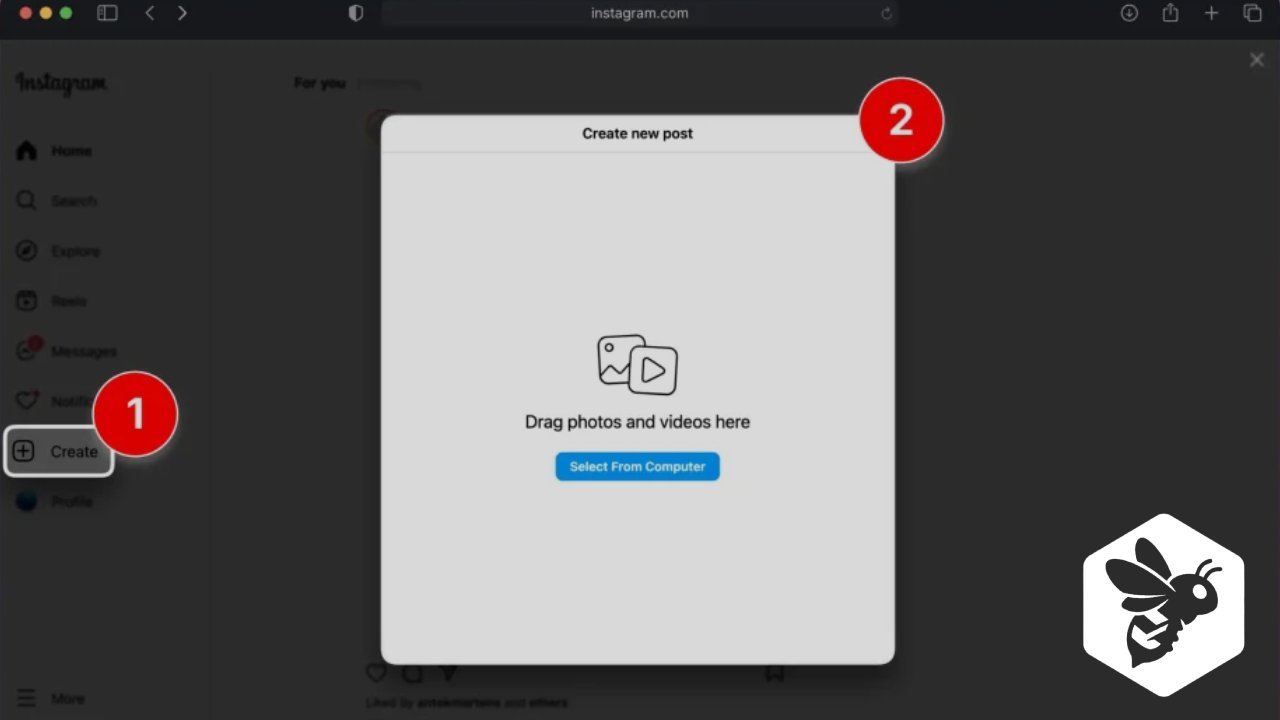
Step 2: Tap the Plus Icon
At the bottom of the screen, tap the plus (+) icon. A menu will appear. Select Reel from the options.
Step 3: Choose How to Add Your Video
You can add your content in two ways:
- Record a new video directly using Instagram’s camera
- Upload an existing video from your phone gallery
For best results, always use a vertical video that fills the screen.
Step 4: Edit Your Reel
This is where your Reel takes shape. Instagram offers simple editing tools that are easy to use.
Editing options include:
- Adding music or audio
- Writing text on the video
- Applying filters
- Trimming clips
Keep edits clean and readable. Too many effects can distract viewers.
Step 5: Add Caption and Share
Tap Next. Write a clear and friendly caption. Add relevant hashtags to help people find your Reel. Choose a cover image if you want your profile to look neat. Finally, tap Share.
Your Reel is now live and ready to be seen.
Also Read: How to Make a Reel on Instagram
Instagram Reels Posting Checklist
| Item | Why It Matters |
|---|---|
| Vertical video | Fits mobile screens |
| Clear sound | Keeps viewers watching |
| Simple text | Easy to read |
| Hashtags | Increase reach |
| Cover image | Improves profile look |
Best Practices for Instagram Reels
Old habits still guide success. Simplicity and consistency matter more than flashy tricks.
Content Tips
Strong content starts with clarity.
Helpful content tips:
- Focus on one idea per Reel
- Keep videos short and direct
- Use natural lighting
- Add subtitles for silent viewers
Caption Writing Tips
Captions support your video and guide viewers.
Good caption habits:
- Use short sentences
- Add a clear message
- Ask a simple question
- Avoid long paragraphs
Hashtag Usage Tips
Hashtags help your Reel travel further.
Best practices:
- Use relevant hashtags
- Mix popular and small hashtags
- Avoid using too many
- Keep them related to content
Also Read: How Long Can Instagram Reels Be
Best Time to Post Instagram Reels
Timing plays a quiet but important role. Posting when people are active increases visibility.
General Posting Times
| Time of Day | Engagement Level |
|---|---|
| Morning | Medium |
| Afternoon | Low |
| Evening | High |
| Night | Medium |
Evenings often work best, but checking your audience insights gives better results.
Common Mistakes to Avoid
Mistakes can reduce reach even if the content is good.
Avoid these errors:
- Posting horizontal videos
- Using unclear audio
- Adding too much text
- Ignoring trends completely
- Posting without consistency
How Often Should You Post Reels
Consistency builds trust with the algorithm and viewers.
Recommended posting frequency:
- Beginners: 2 to 3 Reels per week
- Growing accounts: 4 to 5 Reels per week
- Active pages: 1 Reel daily
Regular posting is better than posting many videos at once and then stopping.
How to Improve Reel Performance
Growth does not come overnight. It grows slowly, like old trees that stand strong for years.
Ways to improve performance:
- Watch your Reel insights
- Learn from high-performing Reels
- Use trending sounds carefully
- Respond to comments
- Share Reels on Stories
Instagram Reels for Business and Creators
Reels are powerful for businesses and creators alike. They help show products, services, stories, and updates in a simple way.
Ideas for Business Reels
- Product showcases
- Customer reviews
- Behind-the-scenes videos
- Quick tips and guides
Ideas for Creators
- Educational clips
- Daily routines
- Motivational messages
- Skill demonstrations
Final Thoughts
Instagram Reels are a bridge between tradition and innovation. They reward honesty, clarity, and patience. You do not need expensive tools or complex edits. A clear idea, steady hands, and respect for the basics can take you far.
By following these steps and keeping your content simple and meaningful, Reels can become a lasting voice for your profile in the fast-moving world of social media.
Frequently Asked Questions (FAQs)
What is the maximum length of an Instagram Reel?
An Instagram Reel can be up to 90 seconds long. Shorter Reels often perform better because viewers prefer quick and clear content.
Can I post a Reel using an old video?
Yes, you can upload an existing video from your phone gallery. Just make sure it is vertical and clear for the best viewing experience.
Do hashtags really help Instagram Reels?
Yes, hashtags help Instagram understand your content and show it to the right audience. Use relevant and limited hashtags for better reach.
How often should I post Instagram Reels?
Posting 2 to 5 Reels per week is a good balance. Consistency matters more than posting many Reels at once.
Why are my Instagram Reels getting low views?
Low views can happen due to poor timing, unclear video quality, weak captions, or lack of consistency. Improving content quality and posting regularly can help increase views.